
Modern website promotion is impossible without understanding how search engines see your resource. This is where Google Search Console comes to the forefront — a free tool from Google that allows you to track indexing, errors, traffic, and the overall condition of your website in search. Adding a website to this service is a basic but critically important step for any project, regardless of its scale.
What is Google Search Console and why it is needed
Google Search Console is not just a “statistics panel”. It is a tool through which you literally interact with the search engine. It shows which pages are indexed, which are not, which queries bring users, and where there are technical issues.
Without connecting this service, you are essentially working “blindly”. A website may have errors, not be indexed, or lose traffic — and you won’t even know why.
Getting started: account creation and login
To add a website, you need a Google account. If you use Gmail or other Google services — you already have one. Next, you need to go to Google Search Console and log in.
After logging in, the system will prompt you to add a new property. And here is an important point: Google offers two types of properties, and the way you verify the website depends on your choice.
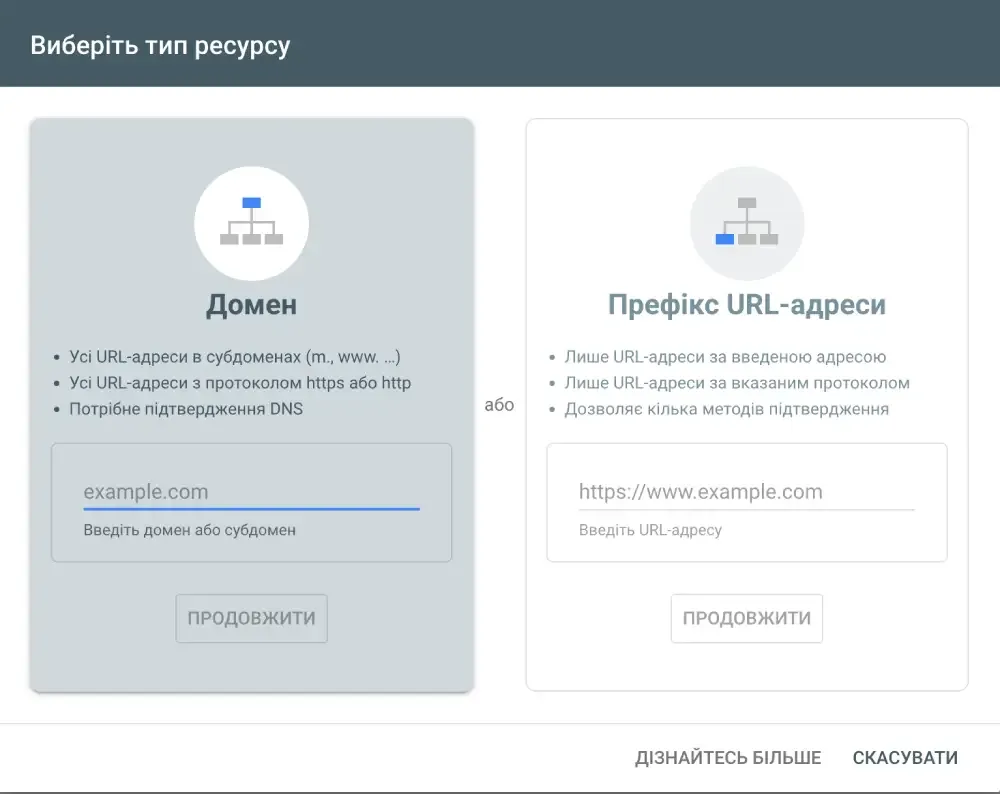
Choosing the property type: domain or URL
There are two options:
The first is a domain property. It covers the entire website: with www, without www, with http and https, as well as all subdomains. This is a more correct and modern option.
The second is a URL prefix property. It works only for a specific address, for example only for https://site.com.
If you want full control and accurate analytics — it is better to choose the domain option.
Website ownership verification
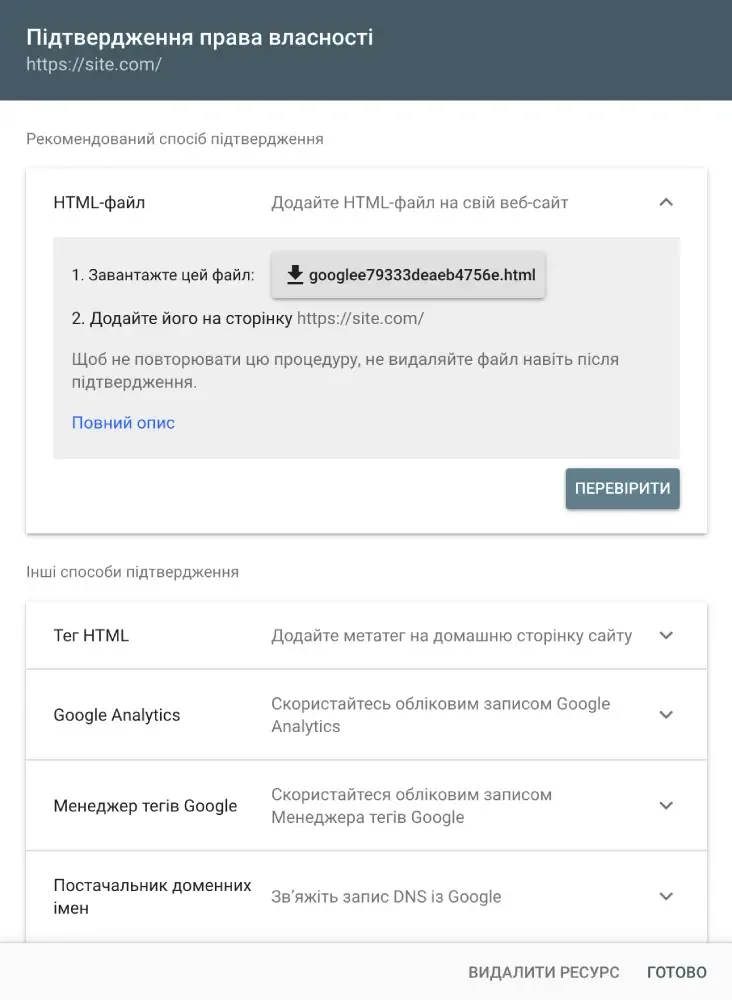
After adding the property, you need to prove to Google that the website actually belongs to you. This is a mandatory step.
For a domain property, verification via DNS is used. This means you need to go to your domain management panel and add a special TXT record that signals to Google that you have access to the domain.
This process looks complicated only at first glance. In fact, you copy the code from Search Console and paste it into the domain’s DNS zone. After that, Google checks the record and confirms ownership.
If you use a URL prefix property, other options appear: uploading an HTML file, adding a meta tag to the <head>, or verification via Google Analytics. But these methods are less universal.
Adding sitemap: an important step after connection
After successful verification, the website is already “visible” to Google, but this does not mean that all pages will be quickly indexed.
Here it is important to add a sitemap file — this is a website map that contains a list of all pages you want to show to the search engine.
Usually, the sitemap is available at:
https://your-site.com/sitemap.xml
In Google Search Console, there is a separate section for adding a sitemap. You simply paste the link and submit it for processing. After that, Google starts actively crawling the pages.

Checking page indexing
After connecting, it is important to check whether the website is indexed. In Search Console, there is a URL inspection tool. You paste the page address — and the system shows its status.
If a page is not indexed, you can manually submit it for indexing. This is especially useful for new pages or after making changes.
Data analysis: what you get after connection
A few days after adding the website, statistics begin to appear. And here the most valuable thing opens up:
you see real search queries that users come from, the website’s positions in search results, CTR (click-through rate), and the number of impressions.
This gives an understanding of what works and what doesn’t. For example, if a page has many impressions but few clicks — the problem is in the title or description.
Common mistakes when connecting
Many people add a website formally but make mistakes that reduce the benefits to zero.
One of the most common is choosing the wrong property type. If you select a URL prefix instead of a domain property, some data will simply not be taken into account.
Another problem is the absence of a sitemap. Without it, Google will find pages much slower.
It is also common to forget to check indexing. People add a website and think everything works automatically, but in reality, control is required.
How to understand that everything is done correctly
If the website is added correctly, you will see:
– an increase in the number of indexed pages
– the appearance of search queries in statistics
– no critical errors in the “Coverage” section
This means that Google interacts normally with your website.
Adding a website to Google Search Console is not just a technical action, but the foundation for all SEO promotion of a new website. This is where you get real data on which you can make decisions.
If you do this process correctly — you will get full control over how the website appears in Google search. If done formally — the tool will exist, but there will be almost no benefit from it.
That is why it is important not just to add a website, but to understand how the system works and work with it regularly.